Lean Quote Screenshot walkthrough
From drawing
to an estimate
you can follow.
A guided look at the working calculator, using a four-piece Seattle map exported from MapToLaser Express.
Public demo access is coming soon. Captured September 15, 2026. All prices and machine settings below are illustrative examples in USD, not production instructions or shop quotes.
01 / Import and review
Confirm what should be
cut, engraved, or ignored.
Upload a DXF, SVG, or MTLE ZIP up to 5 MB. For a ZIP, choose a physical piece from the project tabs. Inspect its dimensions and color-coded paths before confirming the work.
Here, the selected Seattle detail DXF contains frame and water-depth cuts, street engraving and title linework. The layer selectors keep those operations visible. A source comparison also asks the reviewer to choose the DXF because the alternate SVG has clipping limitations and slightly different measurements.

Use mm or inches.
The display switch changes measurement units only. The separate file-unit override corrects a wrongly scaled import and requires measuring again.
Choose an operation.
Unknown layers need a decision. Open raster boundaries need repair or a change to line engraving. Missing instructions are not silently treated as cuts.
Review exclusions.
If you leave a detected operation out of the estimate, the calculator asks you to acknowledge that exclusion and labels the result as partial work.
02 / Choose your costing inputs
Change the rates.
See the effect.
Choose the material, stock thickness, machine and quantity. Open the rate editor to adjust material cost and waste, machine cost per hour, speed or raster coverage, start overhead, setup and minimum charges.
The example below uses 3 mm Baltic birch and an example 80 W CO₂ machine. “Remember my rates” saves the profile in this browser for this material and machine. “Use example rates” restores the starting values.

Changing quantity, stock, machine, operations or rates clears the affected estimate. Calculate again to get a result that matches the current inputs.
03 / Inspect the estimate
Follow the price
back to its inputs.
For one Seattle detail piece, the example calculation totals $49.20: $30.66 of machine cost, $3.54 of material and a $15.00 setup fee. The $25.00 minimum does not change this result because the subtotal is higher.
Machine cost includes $5.62 of cutting and $25.04 of line engraving. Material cost uses the drawing’s 99,324 mm² bounding rectangle plus 15% waste. That is a simple area allowance, not a nesting calculation.

Time is a model-based estimate. Actual machine travel, acceleration, passes and handling can change production time.
04 / Bring the pieces together
Review every piece.
Then total the project.
With all four Seattle pieces reviewed at quantity one, this example totals $125.85: backer $25.27, second depth layer $26.38, detail layer $49.20 and frame $25.00.
Each piece retains its own stock, quantity and estimate. Setup and minimum charges apply separately. The frame’s calculated subtotal is $22.29, so its example $25.00 minimum applies.
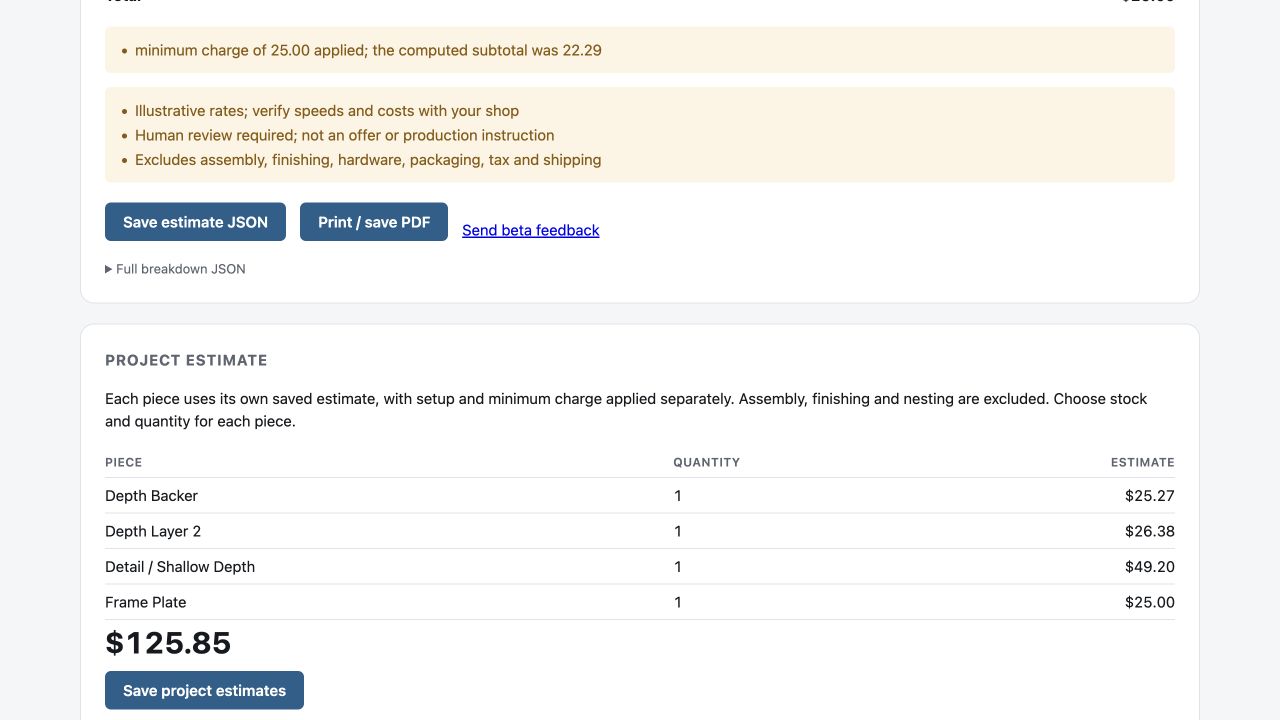
This total excludes nesting savings, assembly, finishing, hardware, packaging, tax and shipping. It is not a purchase price or offer.
05 / Keep a reviewable record
Save the assumptions
along with the number.
Download the selected estimate or the full project as JSON. Each estimate includes its drawing reference, rates, operations, warnings and calculation breakdown. You can also print an estimate or save it as PDF using your browser.
There is no account or server-side estimate library in this demo. Download the results you want to keep. Verify rates with your shop before using an estimate in a customer quote.
Ready to explore the idea?
The public calculator is still being prepared for launch. Tell us what you make, what files you use and which quoting steps take the most time.